Ponerse en contacto
This is a Research Tool AP
Instructions for Function
(Copy of the page under these instructions)
Menu Page is under "Good Will" then "Illinois Family Picks"
Must work on Cell Phones
We need 2 drop down lists created that are alphabetical listed, they are the 2 blue boxes on our flow chart labeled County Name and Precinct Name.
-We need the County List (or pages or Collections or Chapters) to hold 30 county names, and it's Precincts
-The Precinct List has to handle 120 precinct names per county.
1) From the County list name, we need it linked so that when a particular county is selected, the following three (3) blank boxes (Co. Clerk, Co. Treasurer and Co. Sheriff) will automatically fill in with the names from a CMS Collection. There is only one person in each separate county holding these positions.
2) County name (blue box) needs to also be linked to the Precinct drop down list. Every county has their own separate precinct people that are different from county to county. Then when someone clicks from the drop down list of Precinct Names (second blue box) the person for that precinct automatically fills in with the name and address specific to that precinct on the page below the second blue box from the CMS file set up.
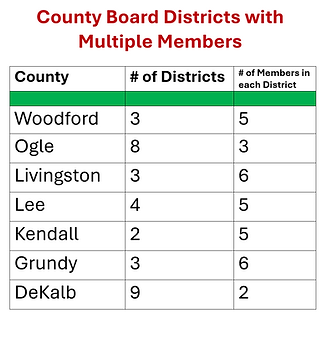
3) County Name, also when clicked from the drop down list, it will then allow the 5th green box only to select a number (1-100) from a Drop Down List and which is specific to that county, to find their given "Co. Board" Member's District #. When the number is selected, the name of the given board member will appear in box on page. Again, there can be (but not always) up to 100 different board members in one specific County.
The Confusing part is over. . . Next. . .
4) Next is the first 1- 4 green boxes (note the 5th green box is explained above). We need the Green Boxes with Numerically Drop Down Lists. They are four separate CMS collections and are all specific or separate from one another. Each collection will hold 100, (plus) names with a link to their website for the name associated with the number they select in the green boxes.
Note: For Congressional, Senatorial, Representative or Judicial entries
5) The Last thing we would like is the red "CLICK NEXT" button. We would like, the 8 fields on the right hand side to pop up names from a CMS collection when the button is pressed. Along with their websites attached to the corresponding name "Web" button on the page.
Special notes:
1) We need CMS files so our Volunteers can enter data from their home computers.
2) Must look like it does on our website "Illinois Family Picks" (Ref. example below).
3) Must work on iPhones. . .
And thats it. . .
Our Budget is $700.00-800.00


FYI
The Problem that we are trying to solve for people in our area to find out by visiting our Website, what it means. They want to know what the little numbers on the bottom of the Illinois voter ID cards mean. And we are trying to make it as simple as possible, especially for our elderly. Please note the bold RED arrows below on our example.


Brief Flow Chart